
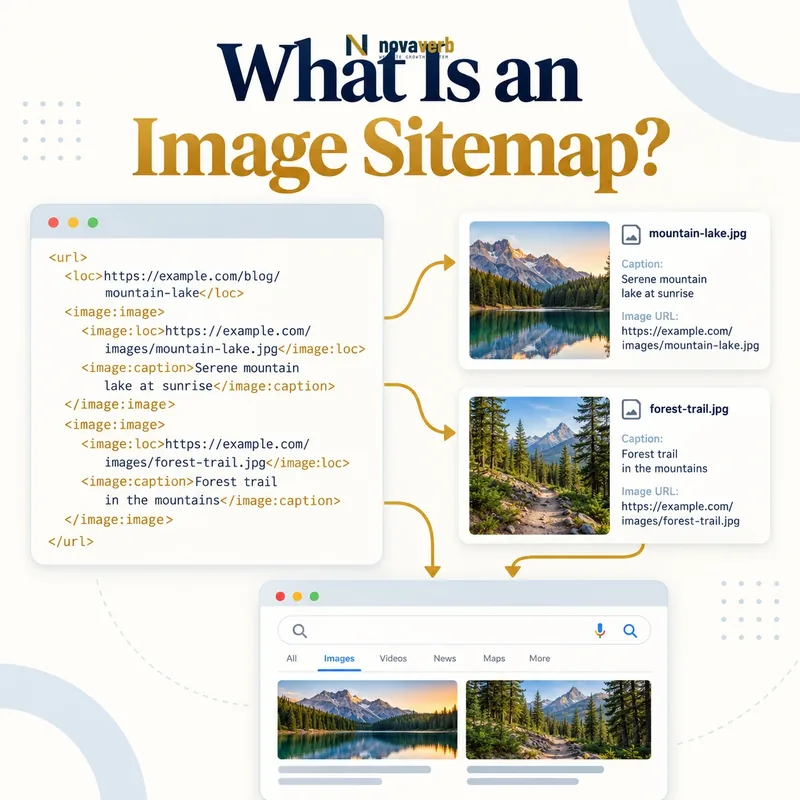
What Is an Image Sitemap?
The file lists a page location and one or more image locations using an image-specific XML namespace. It can be generated as part of the main XML sitemap or maintained separately when the site’s publishing workflow benefits from isolation. Its purpose is discovery, not a guarantee that an image will be indexed or shown.
An image sitemap is most useful when valuable images are difficult to discover through normal HTML, JavaScript rendering, galleries or a separate CDN hostname. It does not replace crawlable pages, successful image responses, relevant context, accurate alt text or efficient Image SEO.
- Identify the exact page, asset, entity or relationship described in this section.
- Inspect the live implementation and retain the observed evidence.
- Compare the observation with the intended meaning and its primary specification.
- Correct any mismatch, then retest the live result.
- Record the accountable owner and review date.
| Component | What it identifies | Purpose |
|---|---|---|
| Sitemap URL entry | Canonical page URL | Defines the parent page |
| Image location | Public image URL | Exposes the visual asset |
| XML namespace | Image extension vocabulary | Makes image elements valid |
| Sitemap index | Collection of sitemap files | Organizes larger inventories |
| Last modified value | Meaningful page update time | Supports change understanding when accurate |
| HTTP response | Public XML delivery | Makes the sitemap fetchable |
- List valuable public images.
- Associate each image with a valid page.
- Keep XML and HTTP responses accurate.
Primary specification: Google Search image sitemap documentation.
An image sitemap is a discovery aid that maps important visuals to their real pages without replacing page or asset quality.
How Does an Image Sitemap Work?
A sitemap entry starts with a page URL. Nested image elements identify the relevant image URLs for that page. The crawler can queue those addresses for discovery, then independently evaluate whether each page and image is accessible, useful and eligible for further processing.
The sitemap does not bypass access controls. A blocked image, expired signed URL, 404 response or inaccessible CDN host remains unusable. Likewise, listing an image under an unrelated page does not create genuine relevance. The map should reflect what users can actually find on the rendered page or in its meaningful content.
- The exact page, asset, entity or relationship covered by this section
- The live implementation rather than an editor-only preview
- The primary specification or first-party record defining the expected behavior
- The validation result, accountable owner and review date
| Stage | System action | Required evidence |
|---|---|---|
| Generate | Create page-image pairs | Current CMS or asset records |
| Publish | Serve valid XML publicly | Successful stable response |
| Discover | Crawler reads sitemap | Reachable sitemap URL |
| Fetch page | Evaluate parent document | Correct status and canonical |
| Fetch image | Request asset URL | Correct status and image MIME type |
| Reconcile | Compare map with live content | Image genuinely belongs to page |
- Select eligible page and image records.
- Generate valid namespaced XML.
- Publish and reference the sitemap.
- Monitor fetch and asset outcomes.
The workflow is publish an accurate mapping, expose it reliably, then let page and image responses prove that the relationship is real.
When Do You Need an Image Sitemap?
A small editorial site with semantic image markup and strong internal linking may gain little from a separate image sitemap. An ecommerce catalog with thousands of variants, a property portal, recipe library, stock-photo collection or visual documentation system may have more to gain because image inventory is large and changes frequently.
The decision should come from evidence. If valuable image URLs are already discovered and served correctly, improving page context or delivery may be a higher priority. If crawl records show important assets are absent, orphaned behind interaction or hosted on a poorly exposed CDN, a sitemap can close a specific discovery gap.
- Identify the exact page, asset, entity or relationship described in this section.
- Inspect the live implementation and retain the observed evidence.
- Compare the observation with the intended meaning and its primary specification.
- Correct any mismatch, then retest the live result.
- Record the accountable owner and review date.
| Site situation | Likely value | Reason |
|---|---|---|
| Small semantic blog | Low to moderate | Images already easy to discover |
| Large ecommerce catalog | High potential | Many product and variant assets |
| JavaScript gallery | High when URLs are hidden | Interaction can delay discovery |
| Image CDN hostname | Useful | Explicitly exposes separate asset host |
| Stock photo library | High potential | Visual inventory is core content |
| Decorative marketing site | Low | Few images have search value |
| Private application | None for private assets | Content is not publicly eligible |
- Prioritize business-critical visual inventory.
- Measure discovery before adding complexity.
- Exclude private and decorative assets.
Create an image sitemap to solve a measured discovery problem, not merely because the CMS offers a checkbox.
What Should an Image Sitemap Include?
Include product hero and gallery images, original diagrams, editorial photographs, recipe steps, property photos or other visuals with independent value. The chosen URL should deliver the intended image directly with a correct content type. Use the same preferred protocol and hostname that the public page references.
Exclude tracking pixels, icons, logos repeated on every page, placeholders, thumbnails that exist only as interface chrome, expired variants and images behind authentication. Avoid listing every generated size as a separate discovery target unless each version has a distinct public purpose. The sitemap should represent visual content, not an asset dump.
- The exact page, asset, entity or relationship covered by this section
- The live implementation rather than an editor-only preview
- The primary specification or first-party record defining the expected behavior
- The validation result, accountable owner and review date
| Image type | Include? | Reason |
|---|---|---|
| Primary product image | Yes | High-value visual content |
| Useful gallery view | Yes | Shows meaningful variant or detail |
| Original chart or diagram | Yes | Supports editorial information |
| Property or recipe step photo | Yes | Core visual evidence |
| Sitewide icon | No | Interface chrome |
| Tracking pixel | No | No search or reader value |
| Placeholder image | No | Not the intended content |
| Private account upload | No | Not publicly accessible |
- Classify image types by reader value.
- Keep only public stable URLs.
- Map each asset to relevant pages.
- Remove placeholders and interface files.
A focused sitemap of valuable, stable images is more useful and maintainable than a complete export of every file in storage.
How Should CDN Image URLs Be Handled?
A separate CDN hostname can improve delivery, but it introduces another DNS, certificate, access and cache surface. Confirm the image URL returns a successful response without session cookies, referrer-only authorization or short-lived signatures. The CDN should not serve an HTML error page under an image-like filename.
Transformation parameters deserve discipline. A page may request width-specific variants, yet the sitemap should usually identify a stable meaningful asset rather than endless combinations of width, quality and format. Align cache keys and canonical asset policy so a crawler does not discover a combinatorial set of equivalent files.
- Identify the exact page, asset, entity or relationship described in this section.
- Inspect the live implementation and retain the observed evidence.
- Compare the observation with the intended meaning and its primary specification.
- Correct any mismatch, then retest the live result.
- Record the accountable owner and review date.
| CDN concern | Risk | Control |
|---|---|---|
| Signed URL expiry | Image later returns denial | Use stable public delivery for eligible assets |
| Transformation parameters | Many equivalent URLs | Choose deliberate canonical asset variant |
| Wrong MIME type | HTML error returned as image | Validate headers and decoded content |
| Hotlink protection | Crawler request blocked | Use compatible public access policy |
| Hostname migration | Old sitemap URLs fail | Redirect or update mappings intentionally |
| Cache inconsistency | Regional stale or missing image | Test multiple edges |
| Certificate coverage | HTTPS fetch fails | Maintain valid host certificate |
- Test CDN assets without logged-in state.
- Limit parameter combinations.
- Verify regional response consistency.
Use CDN URLs in an image sitemap only when the edge address is a durable public identity, not a temporary transformation request.
How Do Image Sitemaps Affect SEO?
A better discovery path may help a search system find a product photo, diagram or gallery asset that normal crawling missed. That can expand the inventory available for image-oriented results and reinforce the page’s visual coverage. The benefit depends on whether the asset answers a real visual intent and belongs to a strong page.
The sitemap cannot repair vague filenames, missing meaning, oversized delivery or poor page context. Image bytes may affect Largest Contentful Paint, while missing dimensions may affect Cumulative Layout Shift. Discovery and experience are separate workstreams that should support one another.
- The exact page, asset, entity or relationship covered by this section
- The live implementation rather than an editor-only preview
- The primary specification or first-party record defining the expected behavior
- The validation result, accountable owner and review date
| SEO outcome | Possible sitemap contribution | Separate requirement |
|---|---|---|
| Asset discovery | Expose hidden or weakly linked URL | Image must return correctly |
| Visual coverage | Surface more valuable inventory | Visual must match query intent |
| Page association | Map image to relevant document | Page context must be genuine |
| Fresh inventory | Update current product or editorial assets | Generation must stay synchronized |
| Performance | No direct speed improvement | Format, size, CDN and caching |
| Accessibility | No text alternative provided | Alt text and visible explanation |
- Fix page and asset access first.
- Expose important missing images.
- Monitor discovery and traffic changes.
- Continue improving content and delivery.
An image sitemap adds SEO value only by exposing worthwhile images whose pages, responses and user experience are already sound.
What Image Sitemap Mistakes Are Common?
A sitemap can return 200 while containing malformed namespaces or escaped characters. Parent URLs may redirect, be noindexed or canonicalize elsewhere. Image URLs may return 403, 404, HTML, or an expired placeholder. These contradictions reduce trust in the file and create investigation work.
Automated generators can keep deleted images forever or export every thumbnail and format variant. Multiple page entries may legitimately reference one shared image, but mass reuse can also reveal generic imagery with little value. Last-modified values should reflect real updates rather than resetting on every sitemap build.
- Identify the exact page, asset, entity or relationship described in this section.
- Inspect the live implementation and retain the observed evidence.
- Compare the observation with the intended meaning and its primary specification.
- Correct any mismatch, then retest the live result.
- Record the accountable owner and review date.
| Mistake | Observed symptom | Fix |
|---|---|---|
| Invalid namespace or XML | Parser rejects file | Validate generated document |
| Redirecting parent URL | Extra hop or inconsistent mapping | List preferred page URL |
| Broken image URL | 403/404 or HTML body | Repair or remove asset |
| Expired signed link | Works briefly then fails | Use stable public URL |
| Every variant listed | Duplicate crawl space grows | Choose intentional image identity |
| Stale deleted asset | Repeated failed fetch | Synchronize with publishing lifecycle |
| Fake lastmod churn | Every entry appears changed | Write only meaningful timestamps |
- Validate syntax and live responses.
- Remove stale inventory automatically.
- Do not manufacture freshness signals.
The most harmful sitemap is one that confidently describes an inventory the public site no longer serves.
How Do You Audit an Image Sitemap?
Start with sitemap discovery and HTTP delivery: status, content type, compression, encoding and size. Parse the XML and count parent pages, image entries, duplicates and malformed URLs. Segment by template and image type so one huge file does not hide a broken catalog feed.
For sampled pairs, fetch the parent page and image without authentication. Compare canonical page URL, rendered image reference, response status, MIME type, dimensions and image hash. Check redirects and CDN regions. Reconcile additions and deletions against the CMS or source inventory, then monitor error trends after publishing.
- The exact page, asset, entity or relationship covered by this section
- The live implementation rather than an editor-only preview
- The primary specification or first-party record defining the expected behavior
- The validation result, accountable owner and review date
| Audit check | Evidence | Pass condition |
|---|---|---|
| Sitemap delivery | HTTP status and MIME type | Stable successful XML response |
| XML validity | Namespace-aware parser | No structural errors |
| Parent URL | Status and canonical | Preferred indexable page |
| Image response | Status, MIME and body | Valid public image |
| Relationship | Rendered page or content record | Image genuinely belongs to page |
| Duplicates | Normalized URL counts | Only intentional reuse |
| Freshness | CMS additions and deletions | Inventory stays synchronized |
| Regional CDN | Multiple edge requests | Consistent asset availability |
- Fetch and validate the sitemap.
- Profile entries by template and asset type.
- Sample parent and image responses.
- Reconcile against live inventory.
- Fix generator rules and retest.
An audit passes when valid XML describes current, relevant page-image relationships and every sampled public response matches that map.