
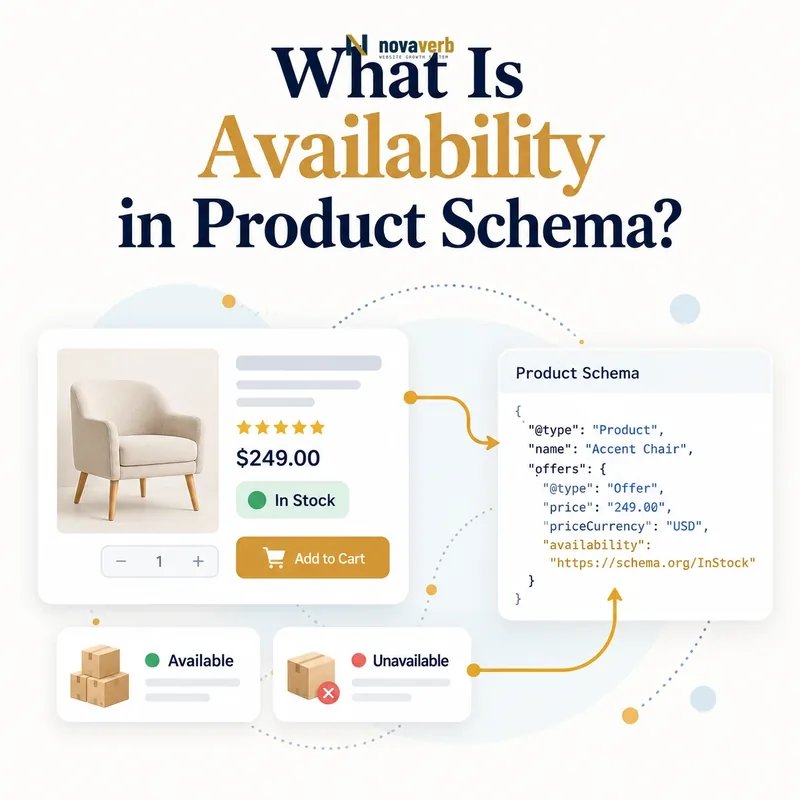
What Is Availability in Product Schema?
Availability in Product structured data states whether a specific Offer can currently be purchased, ordered later, reserved, made to order, or is no longer sold by using an ItemAvailability value.
The property normally belongs on Offer because inventory is commercial state tied to a seller, price, market and fulfillment channel. The same Product can be in stock at one merchant, backordered at another and discontinued by a third. A controlled enumeration makes those differences clearer than free-text labels.
- Identify the exact page, asset, entity or relationship described in this section.
- Inspect the live implementation and retain the observed evidence.
- Compare the observation with the intended meaning and its primary specification.
- Correct any mismatch, then retest the live result.
- Record the accountable owner and review date.
| Offer state | Schema value | Meaning |
|---|---|---|
| Ready to order | InStock | Purchasable now |
| No current inventory | OutOfStock | Not currently available |
| Order before release | PreOrder | Future fulfillment |
| Temporarily delayed | BackOrder | Order accepted despite delay |
| No longer offered | Discontinued | Sale ended permanently |
- Describe the exact offer shown on the page.
- Use a canonical Schema.org URL.
- Keep visible stock messaging aligned.
Use the free backlink checker while reviewing important product destinations.
Primary specification: Schema.org definition for availability.
Availability is accurate when it represents the current purchasability of one clearly scoped Offer.
Why Does Availability Matter for Ecommerce SEO?
Availability matters because it connects search-facing product data with the buying state customers encounter after clicking, reducing contradictions between price, inventory, fulfillment and checkout.
It does not guarantee rankings or a rich result. Its practical value is accuracy and recency. An InStock claim on an unavailable item wastes intent, while OutOfStock on purchasable inventory can hide a viable offer. Inventory facts also change more frequently than product names or descriptions, so their update pipeline deserves stricter monitoring.
- The exact page, asset, entity or relationship covered by this section
- The live implementation rather than an editor-only preview
- The primary specification or first-party record defining the expected behavior
- The validation result, accountable owner and review date
| Mismatch | Customer consequence | Fix |
|---|---|---|
| Markup says InStock, page sold out | False purchase expectation | Repair stale export |
| Markup says OutOfStock, checkout works | Offer appears unavailable | Synchronize inventory state |
| Preorder shown as InStock | Fulfillment timing is hidden | Use PreOrder and visible date |
| Discontinued shown temporary | Users wait for inventory that will not return | Use permanent state honestly |
- Identify the purchasable offer.
- Compare visible messaging and checkout state.
- Trace JSON-LD to its inventory source.
- Measure update latency.
- Verify after the next stock transition.
Availability quality is therefore an operational SEO problem, not only a markup problem.
Reliable availability protects traffic by keeping the search promise aligned with the offer customers can actually buy.
Which ItemAvailability Values Can You Use?
ItemAvailability includes InStock, OutOfStock, BackOrder, PreOrder, PreSale, Discontinued, LimitedAvailability, MadeToOrder, OnlineOnly, InStoreOnly, Reserved, and SoldOut.
Not every consumer surface interprets every value identically, so use the value that truthfully describes the business state and keep the visible page explicit. Channel values such as OnlineOnly and InStoreOnly describe where an item is available, while stock values describe whether it can be purchased. A site may need additional visible messaging for pickup, delivery, release dates or quantity limits.
- Identify the exact page, asset, entity or relationship described in this section.
- Inspect the live implementation and retain the observed evidence.
- Compare the observation with the intended meaning and its primary specification.
- Correct any mismatch, then retest the live result.
- Record the accountable owner and review date.
| Value group | Values | Primary question |
|---|---|---|
| Current stock | InStock, OutOfStock, SoldOut | Can it be bought now? |
| Future or delayed | PreOrder, PreSale, BackOrder | Can an order be placed for later? |
| Supply method | MadeToOrder, LimitedAvailability, Reserved | How constrained is fulfillment? |
| Channel | OnlineOnly, InStoreOnly | Where is it offered? |
| Permanent end | Discontinued | Will normal sale return? |
- Use enumeration URLs rather than custom text.
- Do not invent values such as LowStock.
- Preserve detailed quantities in internal systems.
- Explain constraints visibly to shoppers.
The enumeration gives a broad machine-readable state; the product page supplies the detail needed for a purchase decision.
Choose the standard value that answers the offer's real availability question without forcing several meanings into one field.
Should Availability Go on Product or Offer?
Availability should normally go on Offer because stock belongs to a seller-specific, price-specific and channel-specific opportunity to purchase rather than to the abstract Product identity.
A product model can exist long after one merchant runs out of stock. Marketplaces make the distinction even clearer: several Offers for the same Product may have different sellers, prices, conditions and inventory. Attaching a single availability value to their shared Product can misstate most of those listings.
- The exact page, asset, entity or relationship covered by this section
- The live implementation rather than an editor-only preview
- The primary specification or first-party record defining the expected behavior
- The validation result, accountable owner and review date
| Entity model | Availability scope | Reason |
|---|---|---|
| One product, one offer | Offer | Keeps commercial facts together |
| Several sellers | Each Offer | Inventory differs by merchant |
| Several conditions | Each Offer | Condition and stock must stay paired |
| Product overview only | Omit without an offer | Abstract product is not inventory |
- Map every Product entity.
- List each Offer, seller and URL.
- Attach stock state to the narrowest offer.
- Keep price, condition and availability together.
- Test multi-offer pages separately.
Aggregate summaries should not replace precise offer-level facts when individual listings are visible and purchasable.
Offer-level placement prevents one inventory state from being incorrectly applied to several sellers, conditions or channels.
How Do InStock, OutOfStock, SoldOut, and Discontinued Differ?
InStock means purchasing is currently possible, OutOfStock means inventory is temporarily unavailable, SoldOut indicates available units are gone, and Discontinued means normal sale has ended permanently.
Businesses need an explicit lifecycle policy because “sold out” and “out of stock” are often used interchangeably in templates. The structured state should follow the actual replenishment expectation. A discontinued page may remain useful for support, specifications and successor links, while an out-of-stock page may deserve restock notifications.
- Identify the exact page, asset, entity or relationship described in this section.
- Inspect the live implementation and retain the observed evidence.
- Compare the observation with the intended meaning and its primary specification.
- Correct any mismatch, then retest the live result.
- Record the accountable owner and review date.
| State | Expected next event | Useful page action |
|---|---|---|
| InStock | Order can proceed | Show purchase and fulfillment |
| OutOfStock | Inventory may return | Offer alert or alternatives |
| SoldOut | Allocated supply is exhausted | State whether more units are expected |
| Discontinued | No standard replenishment | Preserve information and link successor |
- Define replenishment expectations in catalog logic.
- Do not delete useful product pages automatically.
- Keep purchase controls consistent with the state.
- Avoid presenting discontinued goods as temporarily delayed.
Availability should describe the offer; URL retention and canonical decisions require a separate content and demand analysis.
Lifecycle states become dependable when stock language, purchase controls and replenishment expectations agree.
How Should PreOrder and BackOrder Be Marked Up?
Use PreOrder when customers can order before a planned release, and BackOrder when an existing product is temporarily unavailable but orders are accepted for later fulfillment.
Both values require more visible context than the enumeration alone provides. Customers need an expected ship or release date, payment timing, cancellation terms and clear uncertainty where timing is not guaranteed. Marking either state InStock because checkout accepts payment hides the fulfillment delay.
- The exact page, asset, entity or relationship covered by this section
- The live implementation rather than an editor-only preview
- The primary specification or first-party record defining the expected behavior
- The validation result, accountable owner and review date
| Question | PreOrder | BackOrder |
|---|---|---|
| Has normal release begun? | Usually no | Usually yes |
| Can customer order? | Yes | Yes |
| Why fulfillment is later | Future launch | Temporary supply gap |
| Critical visible detail | Release date | Expected restock or ship window |
- Confirm the commercial lifecycle state.
- Use the corresponding enumeration URL.
- Show dates or honest timing ranges visibly.
- Keep payment and cancellation terms clear.
- Update availability at launch or replenishment.
A scheduled job should transition preorder inventory when the release state changes, while backorders should follow live supply events.
PreOrder and BackOrder are truthful only when the page explains why fulfillment is delayed and when the state will change.
How Should Availability Work Across Product Variants?
Each purchasable variant needs its own availability when stock differs by size, color, configuration, condition, seller or location, and the selected variant's markup must match its live state.
One in-stock size does not make the whole product group in stock in every configuration. Variant selectors can also leave JSON-LD stuck on the default child while visible controls show another. Server-rendered variant URLs or correctly updated structured data should preserve the relationship among SKU, price, condition and availability.
- Identify the exact page, asset, entity or relationship described in this section.
- Inspect the live implementation and retain the observed evidence.
- Compare the observation with the intended meaning and its primary specification.
- Correct any mismatch, then retest the live result.
- Record the accountable owner and review date.
| Variant situation | Correct handling | Risk |
|---|---|---|
| Some sizes unavailable | State per child Offer | Parent summary overclaims |
| Color selected client-side | Update all linked facts | Stale default JSON-LD |
| Different sellers | Separate offers | Inventory merged across merchants |
| Store pickup by location | Preserve channel or location scope | National state misleads local shopper |
- Map every child in the Product variant group.
- Keep SKU, URL, price and stock aligned.
- Test unavailable default variants.
- Recrawl after client-side selection behavior changes.
Inventory inheritance is safe only when the catalog proves every represented child shares the same state.
Variant availability must stay at the exact granularity customers select, purchase and receive.
What Availability Schema Mistakes Are Common?
Common mistakes include defaulting every offer to InStock, exporting stale inventory, using custom text, confusing preorder with stock, collapsing variants, and leaving purchase controls inconsistent with markup.
Syntax validation cannot prove a warehouse has inventory. The audit must compare rendered markup with the offer page and an authoritative stock or commerce source. Cached pages, delayed feeds and disconnected client-side widgets often create a gap even when each individual system appears correct.
- The exact page, asset, entity or relationship covered by this section
- The live implementation rather than an editor-only preview
- The primary specification or first-party record defining the expected behavior
- The validation result, accountable owner and review date
| Mistake | Root cause | Durable fix |
|---|---|---|
| InStock default | Null fallback | Allow honest unknown and repair mapping |
| Stale OutOfStock | Cache not invalidated | Connect inventory events |
| “Low stock” value | Free text exported | Map to standard state and show detail |
| Preorder marked InStock | Checkout ability confused with fulfillment | Use lifecycle state |
| One state for variants | Parent inheritance | Generate per Offer |
- Trace the observed value to its source.
- Measure feed, cache and render timestamps.
- Fix the source or invalidation path.
- Regenerate affected Offers.
- Verify after a real stock transition.
Testing only stable inventory misses the failure mode; teams should exercise in-stock to out-of-stock and back transitions.
Availability errors are operational synchronization defects that require source, cache and rendered-output verification together.