
What Is Breadcrumb Schema?
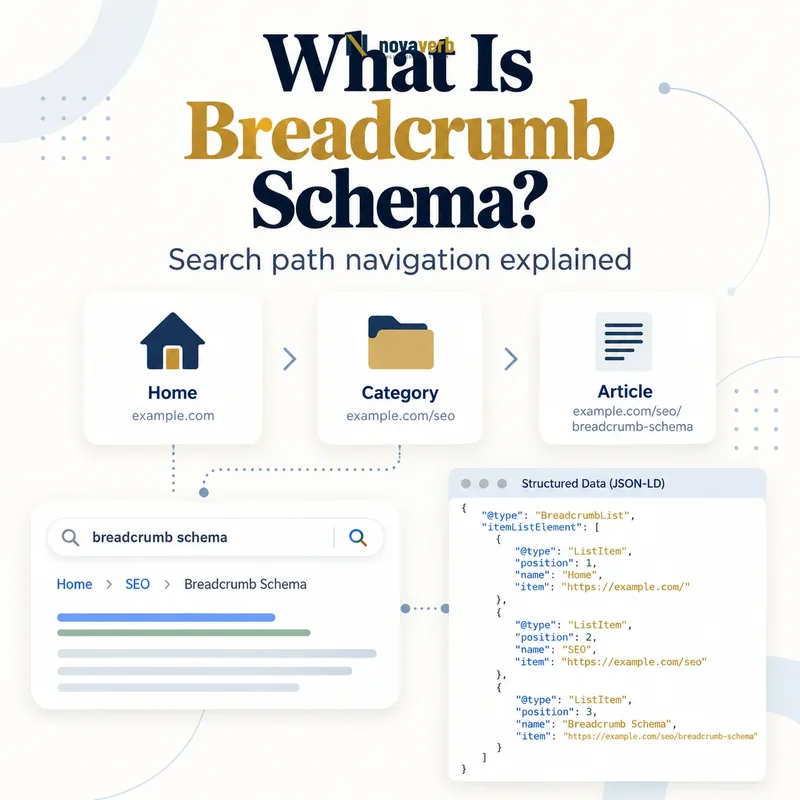
Breadcrumb Schema is structured data that represents a page’s place in a navigational hierarchy through a BreadcrumbList containing ordered ListItem objects.
The markup gives machines an explicit trail such as Home, Resources, Technical SEO and Breadcrumb Schema. Each step has a human-readable name, a numeric position and, except where intentionally omitted for the current page, an item URL. This semantic trail is related to the visible breadcrumb but is not merely decorative code. It should describe a path a visitor can understand and follow. Search systems may use this information to categorize a result and replace a long URL display with a cleaner path, but valid markup does not promise a particular appearance, ranking change or click-through gain. Breadcrumb Schema therefore belongs to information architecture and search presentation, not to a shortcut for rankings.
- Frame the decision raised by What Is Breadcrumb Schema.
- Confirm its value type and the object it describes.
- Compare the markup with visible page information.
- Correct the source data or template without inventing values.
- Validate the rendered result and monitor future changes.
| Element | Role | Example |
|---|---|---|
| BreadcrumbList | Contains the trail | One list per path |
| ListItem | Represents one level | Technical SEO |
| position | Orders the levels | 3 |
| name | Labels the level | Schema Guides |
| item | Identifies the URL | https://example.com/schema |
- Model a meaningful hierarchy.
- Keep labels concise and recognizable.
- Match linked destinations to real pages.
- Treat enhanced display as eligibility, not a promise.
Breadcrumb Schema is useful when its ordered entities accurately describe a real, understandable path to the current page.
The decision for What Is Breadcrumb Schema should rest on live, traceable evidence and a verified follow-up check.
How Is Breadcrumb Schema Different From Breadcrumb Navigation?
Breadcrumb navigation is the visible user interface, while Breadcrumb Schema is the machine-readable representation of that hierarchy.
A visible trail helps visitors move upward through categories and understand context. The structured data expresses comparable meaning in JSON-LD, Microdata or RDFa. A site can technically include one without the other, but divergence creates avoidable ambiguity: markup may claim a category that users cannot reach, or the interface may show a path that the data omits. The durable approach is to generate both from the same taxonomy and page context. Read Breadcrumb Navigation for the UX and internal-link intent; use this article for entity properties, validation and deployment. Separating the intents lets teams diagnose whether a problem belongs to the interface, the taxonomy or the structured-data output.
- Evidence for How Is Breadcrumb Schema Different From Breadcrumb Navigation: the live structured-data entity and property relationship
- The expected value type and any nested object
- Visible page information that supports the structured value
- Related offer or catalog fields needed for interpretation
- A fresh validation result after the page changes
| Dimension | Visible navigation | Structured data |
|---|---|---|
| Audience | People | Machines |
| Primary format | HTML links | JSON-LD, Microdata or RDFa |
| Main value | Orientation and movement | Explicit hierarchy |
| Common failure | Poor UX path | Invalid or mismatched properties |
| Shared source | Site taxonomy | Site taxonomy |
- Define the page taxonomy.
- Render the visible trail.
- Serialize the same trail as data.
- Compare both outputs in QA.
The best implementation produces visible navigation and structured data from one authoritative hierarchy while testing each output independently.
The decision for How Is Breadcrumb Schema Different From Breadcrumb Navigation should rest on live, traceable evidence and a verified follow-up check.
Which Properties Does BreadcrumbList Require?
A BreadcrumbList requires itemListElement with at least two ordered ListItem entries, and each ListItem needs position and name.
The container identifies the object as BreadcrumbList. Its itemListElement holds the ordered entries. Every entry uses @type: ListItem, an integer position beginning at 1, and a name that tells readers what the step represents. The item property supplies the fully qualified URL for a step and is required for intermediate levels in the current search feature documentation; the final page can be represented without an item URL. Schema.org offers broader vocabulary, but search eligibility depends on the properties supported for the feature. More properties do not repair an inaccurate hierarchy, and missing required values cannot be compensated for by unrelated schema.
- Frame the decision raised by Which Properties Does BreadcrumbList Require.
- Confirm its value type and the object it describes.
- Compare the markup with visible page information.
- Correct the source data or template without inventing values.
- Validate the rendered result and monitor future changes.
| Property | Location | Purpose |
|---|---|---|
| @context | Root object | Declares schema.org vocabulary |
| @type | Root and entries | BreadcrumbList and ListItem |
| itemListElement | BreadcrumbList | Stores ordered steps |
| position | ListItem | Declares sequence |
| name | ListItem | Labels the step |
| item | ListItem | Identifies destination URL |
- Use at least two ListItem objects.
- Start positions at one.
- Give every step a meaningful name.
- Use absolute canonical URLs for linked levels.
A complete breadcrumb object uses the smallest accurate set of supported properties and supplies every required value for each ordered step.
The decision for Which Properties Does BreadcrumbList Require should rest on live, traceable evidence and a verified follow-up check.
How Should Breadcrumb Positions Be Ordered?
Breadcrumb positions should begin at 1 and increase by one from the broadest included level to the most specific page level.
The sequence expresses hierarchy rather than visual coordinates. A trail of Resources, SEO Guides and Canonical Tags should use positions 1, 2 and 3 even if the visible design places separators or hides the first level on mobile. Duplicate values, gaps and reversed numbering weaken the object and often reveal a template bug. Position should be derived after filtering any omitted levels so the output remains contiguous. Do not copy database depth blindly if some ancestors are excluded. Multiple valid trails can exist for a page reached through different contexts; each BreadcrumbList must maintain its own independent sequence. Automated tests should assert integers, uniqueness, contiguity and correspondence with the array order.
- Evidence for How Should Breadcrumb Positions Be Ordered: the live structured-data entity and property relationship
- The expected value type and any nested object
- Visible page information that supports the structured value
- Related offer or catalog fields needed for interpretation
- A fresh validation result after the page changes
| Pattern | Valid? | Reason |
|---|---|---|
| 1, 2, 3 | Yes | Contiguous ascending order |
| 0, 1, 2 | No | Expected sequence begins at 1 |
| 1, 3, 4 | No | Position 2 is missing |
| 1, 2, 2 | No | Duplicate position |
| 3, 2, 1 | No | Hierarchy is reversed |
| 1, 2 in each separate list | Yes | Each trail has its own sequence |
- Build the intended trail.
- Remove omitted nodes.
- Renumber from one.
- Assert order and uniqueness.
Reliable positions are computed from the final emitted trail, not inherited from unrelated menu depth or database identifiers.
The decision for How Should Breadcrumb Positions Be Ordered should rest on live, traceable evidence and a verified follow-up check.
Should Breadcrumbs Match the URL Structure?
Breadcrumbs should represent a typical, useful path to the page and do not need to mirror every folder or segment in its URL.
URLs frequently contain implementation details, campaign folders, dates, IDs or legacy paths that do not describe how people browse. A product at /store/p/8472 may belong to Home, Running Shoes and Trail Shoes even though those labels do not occur in the address. Conversely, inventing a marketing category with no navigable destination produces a misleading trail. Choose the canonical conceptual hierarchy that helps a visitor understand the page. The host level and the current page may be omitted under the documented feature rules, but the remaining list still needs at least two items. When a page belongs to several legitimate taxonomies, multiple trails can express those contexts if each one remains accurate and maintained.
- Frame the decision raised by Should Breadcrumbs Match the URL Structure.
- Confirm its value type and the object it describes.
- Compare the markup with visible page information.
- Correct the source data or template without inventing values.
- Validate the rendered result and monitor future changes.
| Source signal | Use directly? | Decision |
|---|---|---|
| URL folders | Sometimes | Use only when semantic |
| Navigation taxonomy | Usually | Strong hierarchy source |
| Database parent ID | After mapping | Convert to user-facing meaning |
| Campaign parameter | No | Not an information level |
| Date archive | Only when useful | Avoid mechanical inclusion |
| Multiple categories | Possible | Use separate accurate trails |
- Prefer navigable categories.
- Exclude tracking and implementation segments.
- Use canonical page destinations.
- Document rules for multi-category pages.
Model the hierarchy people recognize rather than turning technical URL syntax into an artificial breadcrumb path.
The decision for Should Breadcrumbs Match the URL Structure should rest on live, traceable evidence and a verified follow-up check.
Can One Page Have Multiple Breadcrumb Trails?
One page can provide multiple BreadcrumbList objects when it genuinely belongs to more than one useful navigational hierarchy.
A book might appear under Literature, Award Winners and Science Fiction, each reflecting a valid browsing context. Separate lists can describe those paths without merging incompatible branches into one trail. Use an array or multiple objects supported by the chosen serialization, and restart position at 1 within each list. Every destination should resolve, represent the labeled category and stay consistent with visible site navigation. Multiple trails are not a tactic for inserting extra keywords; redundant or fabricated paths make maintenance harder and can misrepresent the page. Teams should select a stable primary taxonomy and add alternatives only when users can actually navigate them. Test every list separately because one valid path does not excuse errors in another.
- Evidence for Can One Page Have Multiple Breadcrumb Trails: the live structured-data entity and property relationship
- The expected value type and any nested object
- Visible page information that supports the structured value
- Related offer or catalog fields needed for interpretation
- A fresh validation result after the page changes
| Scenario | Trail strategy | Reason |
|---|---|---|
| Single taxonomy | One list | Clear canonical path |
| Two real browse paths | Two lists | Both contexts are useful |
| Keyword variants only | One list | Avoid fabricated hierarchy |
| Localized taxonomy | Per-locale lists | Match visible language |
| Faceted URL variants | Usually exclude | Not stable hierarchy |
| Campaign landing path | Exclude unless navigable | Avoid temporary structure |
- Identify real user paths.
- Choose a stable primary path.
- Add only navigable alternatives.
- Validate each list independently.
Use multiple breadcrumb trails only to represent multiple real browsing contexts, never to multiply labels for search exposure.
The decision for Can One Page Have Multiple Breadcrumb Trails should rest on live, traceable evidence and a verified follow-up check.
How Do You Write Breadcrumb Schema in JSON-LD?
Write Breadcrumb Schema in JSON-LD as a BreadcrumbList object whose itemListElement array contains ordered ListItem objects with position, name and item URLs.
Place the JSON-LD in a script element with type application/ld+json, either as a standalone object or within a coherent @graph. Serialize strings safely, use absolute URLs and derive them from canonical routing rather than the current request host. Each intermediate item URL should identify the page represented by its label. The final ListItem may identify the current page with an item URL or omit it according to the supported pattern, but the choice should be consistent across templates. Server-side rendering is operationally simple; JavaScript generation can work when crawlers receive the final object, yet it introduces timing and regression risks. Connect the breadcrumb entity to related JSON-LD and WebSite Schema without duplicating conflicting identities.
- Frame the decision raised by How Do You Write Breadcrumb Schema in JSON-LD.
- Confirm its value type and the object it describes.
- Compare the markup with visible page information.
- Correct the source data or template without inventing values.
- Validate the rendered result and monitor future changes.
| JSON-LD field | Example value | QA check |
|---|---|---|
| @context | https://schema.org | Exact vocabulary URL |
| @type | BreadcrumbList | Correct root type |
| itemListElement | Array | At least two entries |
| position | 1 | Integer and contiguous |
| name | Technical SEO | Matches destination |
| item | Absolute URL | Canonical and crawlable |
- Serialize with a trusted encoder.
- Use canonical absolute URLs.
- Keep labels aligned with navigation.
- Test the rendered script.
Good JSON-LD is generated from canonical taxonomy data, escaped safely and tested as rendered output rather than reviewed only in template source.
The decision for How Do You Write Breadcrumb Schema in JSON-LD should rest on live, traceable evidence and a verified follow-up check.
What Breadcrumb Schema Mistakes Are Common?
Common Breadcrumb Schema mistakes include missing properties, broken URLs, noncontiguous positions, trails that contradict the page and markup that differs from visible navigation.
Templates often emit empty names when category data is missing, use relative URLs that resolve under the wrong host, or preserve database depth as positions after filtering ancestors. Other errors include a one-item list, assigning BreadcrumbList directly to each step, using plain objects instead of ListItem, and leaving staging domains in production data. A validator can detect syntax and required-property failures, but it cannot decide whether “Enterprise” is an honest parent of a pricing page. Review semantic accuracy against the rendered page and actual navigation. Structured data hidden from users or unrelated to primary content may lose eligibility, and passing a test does not guarantee enhanced display. Fix shared generator defects before editing hundreds of records by hand.
- Evidence for What Breadcrumb Schema Mistakes Are Common: the live structured-data entity and property relationship
- The expected value type and any nested object
- Visible page information that supports the structured value
- Related offer or catalog fields needed for interpretation
- A fresh validation result after the page changes
| Mistake | Evidence | Fix |
|---|---|---|
| Only one ListItem | Short array | Add a meaningful parent or omit markup |
| Position gap | 1, 3, 4 | Renumber emitted entries |
| Wrong destination | Label and URL disagree | Correct taxonomy mapping |
| Relative item URL | No scheme/host | Generate canonical absolute URL |
| Staging hostname | Nonproduction domain | Use canonical host helper |
| Invisible invented path | No user navigation | Align with real hierarchy |
- Find sitewide patterns.
- Separate syntax from meaning.
- Fix shared generation logic.
- Revalidate representative templates.
The most important defects are semantic mismatches and shared template errors because they can invalidate an entire page family at once.
Start with a relevant free SEO check, continue the evidence workflow in Site Health, and review pricing when comparing continuous monitoring with a one-time manual review.
The decision for What Breadcrumb Schema Mistakes Are Common should rest on live, traceable evidence and a verified follow-up check.