
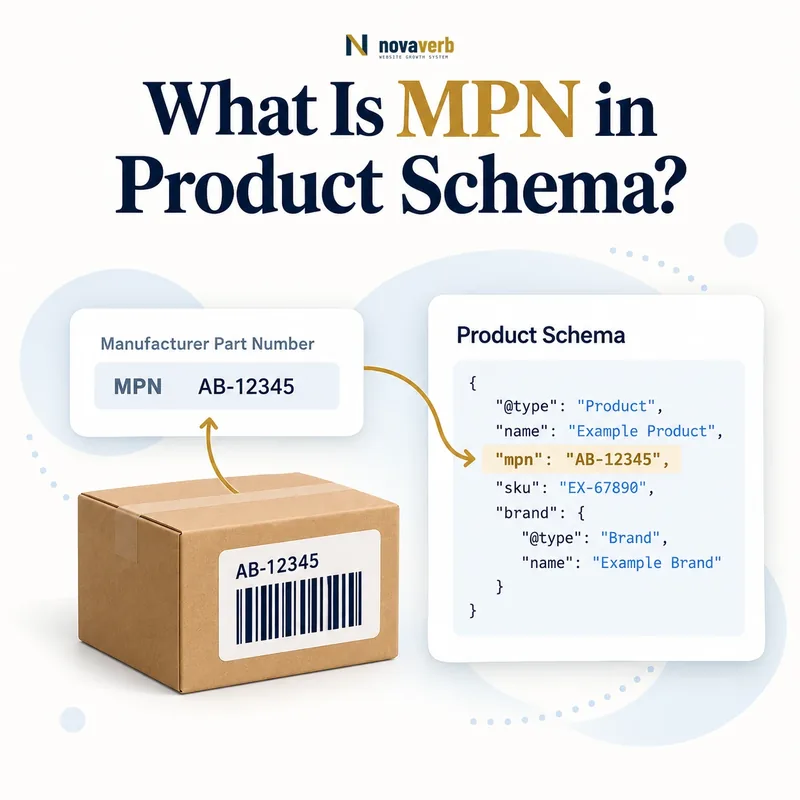
What Is MPN in Product Schema?
MPN in Product Schema is the manufacturer part number that identifies a product or component within the manufacturer’s own catalog.
The mpn property belongs on Product and should contain the exact code assigned by the manufacturer to that item or variant. Unlike a GTIN, an MPN is not a globally standardized trade-item key; its meaning depends on the manufacturer or brand context. Unlike a SKU, it is not merely a seller’s internal stock code. MPN can strengthen product identity when the same part appears across multiple merchants, especially for electronics, machinery, automotive components and replacement parts. It does not replace Product name, brand, GTIN, SKU, variant relationships or Offer data, and it does not guarantee a shopping enhancement or CTR gain. The value must come from authoritative manufacturer evidence rather than a model label guessed by an SEO template.
- Identify the exact page, asset, entity or relationship described in this section.
- Inspect the live implementation and retain the observed evidence.
- Compare the observation with the intended meaning and its primary specification.
- Correct any mismatch, then retest the live result.
- Record the accountable owner and review date.
| Identifier | Issuer | Example |
|---|---|---|
| MPN | Manufacturer | XR-900-BLK |
| GTIN | GS1 identification system | 00123456789012 |
| SKU | Merchant | STORE-XR9-04 |
| Model name | Marketing/catalog label | XR Series |
| ProductGroup ID | Variant family | XR-900-FAMILY |
| Offer ID | Seller transaction | offer-784 |
- Use manufacturer evidence.
- Attach MPN to Product.
- Include brand context.
- Never guess a code.
Primary specification: Schema.org definition for mpn.
A structured MPN is trustworthy only when the manufacturer assigned that exact code to the Product or variant represented on the page.
Why Does MPN Matter for Ecommerce SEO?
MPN matters because it can disambiguate products and parts across merchant catalogs when names, descriptions and seller SKUs differ.
A replacement pump may be sold under shortened titles, localized descriptions and several retailer SKUs while retaining the manufacturer’s part number. That shared identity helps product systems reconcile equivalent offers and distinguish similar-looking components. It is especially useful when a valid GTIN was never assigned, but it should not be presented as a global identifier with the same governance. Wrong MPN data can connect a page to an incompatible part or sibling model, causing more harm than an omitted field. Accurate mapping also improves internal catalog joins, feed diagnostics, compatibility content and variant QA. MPN is evidence, not a ranking shortcut: its SEO value comes from making the page’s product identity traceable to a manufacturer source and consistent across Product markup, visible specifications and merchant data.
- The exact page, asset, entity or relationship covered by this section
- The live implementation rather than an editor-only preview
- The primary specification or first-party record defining the expected behavior
- The validation result, accountable owner and review date
| Use case | Identity benefit | Risk if wrong |
|---|---|---|
| Replacement part | Exact component match | Compatibility failure |
| Electronics model | Distinguishes revision | Sibling model merge |
| Multi-merchant sale | Shared manufacturer key | False offer grouping |
| Feed reconciliation | Page/feed mapping | Conflicting product |
| Catalog deduplication | Equivalent item detection | False duplicate |
| Search presentation | Entity evidence | No guaranteed result |
- Find manufacturer source.
- Map exact item.
- Reconcile merchant systems.
- Monitor identity conflicts.
MPN helps search and commerce systems only when it resolves ambiguity to the correct manufacturer item rather than adding an unverified alphanumeric field.
How Is MPN Different From GTIN and SKU?
MPN is manufacturer-specific, GTIN identifies a trade item globally and SKU identifies an item inside one merchant’s catalog.
A brand assigns MPN to organize parts or models. GS1-issued identification rules govern GTIN formats, while each merchant controls its own SKU scheme. The same item can therefore have one GTIN, one manufacturer part number and different SKUs across sellers. Read GTIN in Product Schema and SKU in Product Schema for their distinct rules. Never copy an MPN into GTIN because it contains the right number of digits, or copy a supplier SKU into MPN because the manufacturer field is empty. When GTIN is unavailable, brand plus a verified MPN can provide useful identity evidence, but absence of GTIN does not authorize inventing either code.
- Identify the exact page, asset, entity or relationship described in this section.
- Inspect the live implementation and retain the observed evidence.
- Compare the observation with the intended meaning and its primary specification.
- Correct any mismatch, then retest the live result.
- Record the accountable owner and review date.
| Identifier | Identity scope | Can merchants change it? |
|---|---|---|
| mpn | Manufacturer catalog | Merchants should preserve it |
| gtin | Global trade item | No for same trade item |
| sku | Merchant inventory | Yes |
| brand | Manufacturer/brand context | Supports MPN meaning |
| model | Public model label | May be broader |
| productGroupID | Variant family | Not a part number |
- Identify the issuer.
- Confirm identity scope.
- Map each property separately.
- Omit unsupported values.
Use MPN, GTIN and SKU according to who issued each code, and never infer one identifier type from another.
Why Does MPN Need Brand Context?
MPN needs brand or manufacturer context because the same character sequence can be reused independently by different manufacturers.
“A100” might identify a motor for one brand and a filter for another. The part number becomes meaningful when Product also names the correct brand or manufacturer and the visible page describes the matching item. Structured data should therefore combine an accurate mpn with brand.name when known. Do not attach a marketplace seller’s name as the brand simply because it fulfilled the order. White-label and private-label products require careful evidence: the visible consumer brand may differ from the factory’s internal code, and an internal factory part number is not automatically public MPN data. When multiple manufacturers participate in a bundle, map codes to the child components rather than assigning every MPN to the bundle Product.
- The exact page, asset, entity or relationship covered by this section
- The live implementation rather than an editor-only preview
- The primary specification or first-party record defining the expected behavior
- The validation result, accountable owner and review date
| Context | Good evidence | Risk |
|---|---|---|
| Brand name | Visible product brand | Seller confused with brand |
| Manufacturer catalog | Part lookup record | Unofficial reseller guess |
| Packaging label | MPN printed on item | Warehouse sticker mistaken |
| Private label | Authorized brand record | Factory code exposed |
| Bundle | Child component MPNs | All codes on parent |
| Marketplace seller | Transaction party | Not necessarily manufacturer |
- Verify brand identity.
- Locate manufacturer record.
- Separate seller from maker.
- Map bundle components.
An MPN identifies the right item only when the Product’s brand and manufacturer evidence establish who owns that part-number namespace.
How Should MPN Work With Product Variants?
Each variant should carry the manufacturer part number assigned to its exact configuration, while ProductGroup represents the shared family.
Color, size, capacity, region, revision and package configuration may receive distinct manufacturer part numbers. If the manufacturer uses one MPN for all sizes, preserve that genuine rule; do not force uniqueness beyond the source. When distinct MPNs exist, every child Product in Product Variant Schema must map to its own code. A parent family label or series number should not be copied into each child mpn unless the manufacturer actually treats it as the part number. Variant selectors need to keep visible MPN, SKU, GTIN, image, Offer and structured Product state aligned. Separate variant URLs should expose the code for their selected child. Audit sibling duplicates as review candidates, not automatic errors, because manufacturer assignment determines the truth.
- Identify the exact page, asset, entity or relationship described in this section.
- Inspect the live implementation and retain the observed evidence.
- Compare the observation with the intended meaning and its primary specification.
- Correct any mismatch, then retest the live result.
- Record the accountable owner and review date.
| Variant dimension | MPN handling | QA question |
|---|---|---|
| Color | Source-specific child code | Did manufacturer vary it? |
| Capacity | Often distinct code | Exact storage model? |
| Regional version | May differ | Correct market item? |
| Revision | Usually distinct | Old/new hardware merged? |
| Size | Source-dependent | Do not assume uniqueness |
| ProductGroup | Family relationship | Do not substitute series name |
- Follow manufacturer assignment.
- Map child Products precisely.
- Keep family ID separate.
- Review, not blindly reject, duplicates.
Variant MPN mapping should reproduce the manufacturer’s actual assignment, whether codes are unique per child or legitimately shared.
How Do You Validate an MPN?
Validate an MPN by preserving its exact manufacturer format and confirming it against authoritative brand, packaging or manufacturer catalog evidence.
Unlike GTIN, MPN has no universal digit length or shared checksum rule. Validation therefore depends on source authority and context. Capture the raw value from manufacturer documentation, authorized data feeds, packaging or the product itself. Normalize presentation cautiously: hyphens, slashes, spaces and case may be meaningful in the manufacturer’s scheme. Do not strip characters merely to satisfy an internal regex. Compare brand, model, variant, region and revision. Check that the same code appears in the visible specifications and merchant feed where appropriate. Supplier spreadsheets and marketplaces can contain copied errors, so record evidence provenance and confidence. If two sources disagree, resolve the conflict with the manufacturer rather than selecting the value that produces fewer SEO warnings.
- The exact page, asset, entity or relationship covered by this section
- The live implementation rather than an editor-only preview
- The primary specification or first-party record defining the expected behavior
- The validation result, accountable owner and review date
| Validation layer | Evidence | Pass condition |
|---|---|---|
| Source | Manufacturer/brand record | Authoritative provenance |
| Formatting | Exact raw code | No destructive normalization |
| Brand | Correct namespace owner | Matches Product |
| Variant | Configuration/revision | Exact child |
| Visible parity | Specifications | Same public MPN |
| Feed parity | Merchant export | No unresolved conflict |
- Collect authoritative raw code.
- Preserve manufacturer formatting.
- Match brand and variant.
- Resolve source conflicts.
MPN validation is an evidence-matching task, not a length or checksum test, because manufacturer namespaces define their own formats.
How Do You Add MPN to Product JSON-LD?
Add MPN to Product JSON-LD as one text value on the exact Product node alongside brand, GTIN and SKU, not inside Offer.
Use "mpn": "XR-900-BLK" on Product and serialize it with a trusted JSON encoder. Preserve case, punctuation and leading zeros according to the manufacturer source. Pair it with the correct Brand object to provide namespace context. Offer Schema should contain price, availability and transaction terms rather than product identifiers. For a variant graph, attach each MPN to its child Product and link that child to ProductGroup. Related Product Schema, Merchant Listing Schema and JSON-LD provide the surrounding structure. Validate rendered production output, then join the extracted code back to manufacturer evidence and catalog records.
- Identify the exact page, asset, entity or relationship described in this section.
- Inspect the live implementation and retain the observed evidence.
- Compare the observation with the intended meaning and its primary specification.
- Correct any mismatch, then retest the live result.
- Record the accountable owner and review date.
| JSON-LD location | Value | QA check |
|---|---|---|
| Product.mpn | XR-900-BLK | Exact manufacturer code |
| Product.brand.name | Example Brand | Correct namespace |
| Product.gtin14 | Global identifier | Separate property |
| Product.sku | Merchant identifier | Separate property |
| Product.offers | Offer | No MPN placement |
| Child Product | Variant code | Correct configuration |
- Attach MPN to Product.
- Preserve exact format.
- Pair with correct brand.
- Validate rendered child mapping.
MPN JSON-LD should preserve one verified manufacturer code on the exact Product node and make its brand context unambiguous.
What MPN Structured Data Mistakes Are Common?
Common MPN mistakes include copying SKU into mpn, using a series name as a part number, assigning the wrong brand and inheriting one sibling code across variants.
Other defects include stripping meaningful punctuation, changing case, exposing factory-only internal codes, attaching component MPNs to a bundle parent and accepting reseller data without manufacturer verification. Plugins may use model as a fallback whenever MPN is empty, creating a confident value that was never assigned as a part number. A rich-result validator cannot know whether “XR900” is a genuine manufacturer code or a marketing label. Crawl rendered Products, compare mpn with brand, catalog and source evidence, and inspect variant inheritance. When no verified MPN exists, omit it rather than inventing one. Repair supplier mapping or product master data before editing JSON-LD.
- The exact page, asset, entity or relationship covered by this section
- The live implementation rather than an editor-only preview
- The primary specification or first-party record defining the expected behavior
- The validation result, accountable owner and review date
| Mistake | Evidence | Fix |
|---|---|---|
| SKU copied to MPN | Same merchant code | Use correct property |
| Series name fallback | No manufacturer evidence | Omit or verify |
| Wrong brand | Namespace mismatch | Correct Product brand |
| Sibling inheritance | All variants use first code | Map source assignments |
| Punctuation stripped | Value differs from source | Preserve exact code |
| Factory code exposed | Not public identifier | Use authorized public MPN |
- Detect field copying.
- Verify brand namespace.
- Audit variant inheritance.
- Remove unsupported codes.
The highest-risk MPN error is a plausible code in the wrong manufacturer namespace because it can misidentify the product across merchants.