
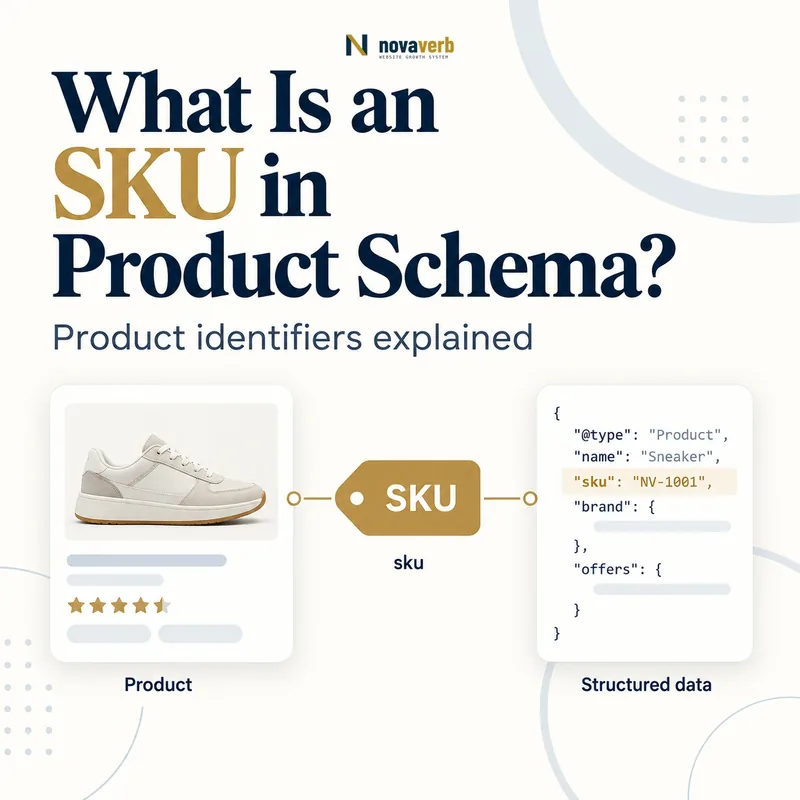
What Is SKU in Product Schema?
SKU in Product Schema is the merchant-specific stock keeping unit used to identify one product or variant inside that seller’s catalog and operations.
The sku property belongs on a Product node and carries the exact internal code used for inventory, orders, feeds and checkout. Unlike a GTIN, the code is not globally shared: two retailers can sell the same trade item under different SKUs. Search product documentation supports at most one SKU value per Product, requires characters valid for interchange and disallows whitespace; ASCII is the safest practical character set. A SKU is valuable because it connects page markup to the seller’s own catalog truth, but it does not replace GTIN, MPN, ProductGroup IDs or Offer data. Publishing a code does not guarantee a shopping enhancement or CTR gain. The identifier should come from the authoritative product master rather than being generated inside an SEO template.
- Identify the exact page, asset, entity or relationship described in this section.
- Inspect the live implementation and retain the observed evidence.
- Compare the observation with the intended meaning and its primary specification.
- Correct any mismatch, then retest the live result.
- Record the accountable owner and review date.
| Identifier | Scope | Example |
|---|---|---|
| SKU | Merchant catalog | TRAIL-BLK-09 |
| GTIN | Global trade item | 00123456789012 |
| MPN | Manufacturer part | XR-900 |
| ProductGroup ID | Variant family | TRAIL-SHOE-2026 |
| Offer ID | Transaction context | Seller offer record |
| Canonical URL | Page identity | /trail-shoe/black-9 |
- Use the catalog’s real SKU.
- Attach it to Product.
- Keep one value per Product.
- Avoid search guarantees.
Primary specification: Schema.org definition for sku.
A structured SKU is reliable when it identifies the exact merchant catalog item represented by the Product and matches every operational system.
Why Does SKU Matter for Ecommerce SEO?
SKU matters because it provides a stable merchant-side identity for reconciling product pages, variants, inventory, feeds, orders and structured data.
Product names can change for merchandising, URLs can be redesigned and descriptions can be localized, while a well-governed SKU remains the operational key for the sellable item. That continuity helps a team diagnose page-feed mismatches, stale inventory, variant swaps and duplicate Product nodes. It also gives a crawler or audit system a join key back to the catalog record. SKU itself is not a ranking factor and should not be stuffed with keywords for search exposure. A wrong code can connect the page to another variant’s price or availability, creating false commercial data. The value comes from dependable internal reconciliation, especially when GTIN is absent or several suppliers use different MPN formats. Treat SKU governance as catalog infrastructure with SEO benefits, not metadata decoration.
- The exact page, asset, entity or relationship covered by this section
- The live implementation rather than an editor-only preview
- The primary specification or first-party record defining the expected behavior
- The validation result, accountable owner and review date
| Operational use | Join enabled | SEO risk detected |
|---|---|---|
| Catalog | Product master | Wrong page identity |
| Inventory | Stock record | Stale availability |
| Pricing | Price book | Offer mismatch |
| Feed | Merchant export | Page-feed conflict |
| Orders | Purchased item | Wrong variant |
| Crawl audit | Rendered Product | Duplicate entity |
- Choose a stable catalog key.
- Join operational systems.
- Detect mismatches.
- Preserve identity over redesigns.
SKU improves SEO operations by making product evidence traceable to one merchant record, not by carrying keywords or replacing global identity.
What SKU Format Rules Apply?
A Product SKU should contain no whitespace, use characters valid for interchange and preferably stay within a consistent ASCII convention.
Current merchant listing documentation allows at most one SKU per Product and explicitly disallows Unicode whitespace characters. Although valid interchange characters are supported, ASCII letters, digits and limited separators such as hyphens or underscores reduce encoding and feed problems. Avoid spaces, tabs, line breaks, emojis, smart punctuation and values that spreadsheets convert unexpectedly. Case sensitivity should be defined by the catalog system; do not lowercase or uppercase during serialization if that changes identity. Store the value as text so leading zeros survive. A code such as 000845-BLK-M is safer than a numeric database type or a display label like “Black / Medium.” The structured value must match the source exactly rather than a normalized URL slug.
- Identify the exact page, asset, entity or relationship described in this section.
- Inspect the live implementation and retain the observed evidence.
- Compare the observation with the intended meaning and its primary specification.
- Correct any mismatch, then retest the live result.
- Record the accountable owner and review date.
| Format aspect | Safe pattern | Risky pattern |
|---|---|---|
| Whitespace | None | Space or tab |
| Character set | ASCII letters/digits | Emoji/smart punctuation |
| Separator | Hyphen or underscore | Uncontrolled symbols |
| Storage | Text | Number/scientific notation |
| Case | Preserve source | Template recasing |
| Count | One per Product | Array of SKUs |
- Eliminate whitespace.
- Preserve source case.
- Store as text.
- Publish one value only.
A good SKU format is one exact, whitespace-free text key that survives databases, JSON, feeds and checkout without transformation.
How Is SKU Different From GTIN and MPN?
SKU is assigned by a merchant, GTIN identifies a trade item globally and MPN identifies a part within the manufacturer’s catalog.
The same product can have one GTIN across sellers while each merchant chooses a different SKU. MPN typically remains consistent within the manufacturer’s system but gains meaning from brand context. These identifiers can coexist on Product because they answer different identity questions. Read GTIN in Product Schema for global identifier formats and verification. Never copy an internal 12-digit SKU into gtin12 based on length, and never use a supplier SKU as your own unless the catalog deliberately adopts it. When GTIN is unavailable, an accurate brand plus MPN and SKU can still provide honest identity evidence. More fields are useful only when each one has a verified issuer and belongs to the exact same item.
- The exact page, asset, entity or relationship covered by this section
- The live implementation rather than an editor-only preview
- The primary specification or first-party record defining the expected behavior
- The validation result, accountable owner and review date
| Property | Assigned by | Cross-seller stability |
|---|---|---|
| sku | Merchant | May differ |
| gtin | GS1 identification system | Same exact trade item |
| mpn | Manufacturer | Stable within manufacturer |
| brand.name | Brand owner identity | Supports MPN context |
| productGroupID | Catalog family | Groups variants |
| URL slug | Web routing | Not an identifier substitute |
- Identify who issued the code.
- Determine its scope.
- Map to the correct property.
- Reject length-based guessing.
Use each identifier according to its issuer and scope, and never promote a local SKU into a global or manufacturer code.
How Should SKU Work With Product Variants?
Each distinct product variant should have its own unique SKU, while the ProductGroup carries a separate family identifier.
Size, color, material, capacity and pack quantity can create separately stocked units. A blue size-medium shirt and a black size-large shirt should not share one SKU if inventory, pricing or fulfillment distinguishes them. Product Variant Schema connects child Product nodes to ProductGroup; each child can carry its exact SKU, GTIN, image, availability and Offer. For single-page selectors, the selected Product identity and visible SKU need to remain synchronized with structured data. For multi-page variants, the page’s canonical and SKU should identify the same child. Do not use the parent group ID in sku simply to eliminate missing values. Audit sibling uniqueness and investigate collisions because one duplicated code can attach the wrong stock or price across an entire family.
- Identify the exact page, asset, entity or relationship described in this section.
- Inspect the live implementation and retain the observed evidence.
- Compare the observation with the intended meaning and its primary specification.
- Correct any mismatch, then retest the live result.
- Record the accountable owner and review date.
| Variant field | Child Product | Parent ProductGroup |
|---|---|---|
| sku | Unique sellable unit | Do not substitute group ID |
| gtin | Exact trade item | Not family aggregate |
| color/size | Selected attributes | Variation dimensions |
| Offer | Child price and stock | Not one family offer |
| image | Selected variant | Shared only when accurate |
| productGroupID | Reference group | Unique family identity |
- Assign child-level SKUs.
- Keep group ID separate.
- Sync selected state.
- Detect sibling collisions.
Variant markup is operationally sound when every child Product maps to one unique SKU and the family uses its own distinct group key.
Should SKU Appear on the Visible Product Page?
SKU should be visible when it helps shoppers, support teams or business buyers verify the item, but structured data must always match the underlying page content and transaction.
A merchant can display “SKU: TRAIL-BLK-09” near specifications or inventory details, especially for parts, wholesale catalogs and products with similar models. Consumer brands may keep the code less prominent, yet the page still needs to represent the same Product to which the structured SKU belongs. Do not expose sensitive internal database IDs or codes that reveal operational secrets; choose the public catalog SKU intended for customer and feed use. Visible parity makes debugging easier and lets support confirm the selected variant. If JavaScript changes the SKU after a selector interaction, update the Product state consistently or use a supported variant graph in initial HTML. Accessibility labels should announce the updated identity when it matters to selection.
- The exact page, asset, entity or relationship covered by this section
- The live implementation rather than an editor-only preview
- The primary specification or first-party record defining the expected behavior
- The validation result, accountable owner and review date
| Visibility choice | When useful | Control |
|---|---|---|
| Specifications row | Parts/B2B products | Exact public SKU |
| Variant selector | Selected child | Update consistently |
| Support reference | Returns/service | Matches order item |
| Hidden database ID | Never publish | Not a public SKU |
| Feed-only code | Possible but harder to verify | Maintain parity evidence |
| Accessible update | Dynamic variant | Announce state |
- Choose the public SKU.
- Place it near identity details.
- Sync variant changes.
- Test accessible updates.
Publish the public catalog SKU where it aids verification, while never exposing a private internal key or allowing visible and structured identities to diverge.
How Do You Add SKU to Product JSON-LD?
Add SKU to Product JSON-LD as one text value on the exact Product node, separate from its Offer, identifiers and ProductGroup relationship.
Use "sku": "TRAIL-BLK-09" alongside Product name, image, brand, GTIN or MPN. Do not place sku inside Offer Schema; Offer describes the seller transaction, while Product owns item identity. Serialize the catalog string with a trusted JSON encoder, preserving leading zeros, case and separators. For a variant graph, each child Product receives its own sku and links to the ProductGroup. Related Product Schema, Merchant Listing Schema and JSON-LD provide the surrounding object requirements. Validate rendered output rather than a code sample, then join the extracted SKU back to catalog, inventory, price and canonical URL.
- Identify the exact page, asset, entity or relationship described in this section.
- Inspect the live implementation and retain the observed evidence.
- Compare the observation with the intended meaning and its primary specification.
- Correct any mismatch, then retest the live result.
- Record the accountable owner and review date.
| JSON-LD location | Value | QA check |
|---|---|---|
| Product.sku | TRAIL-BLK-09 | Exact catalog text |
| Product.gtin14 | Global code | Separate identifier |
| Product.mpn | Manufacturer code | Separate identifier |
| Product.isVariantOf | ProductGroup | Correct family |
| Product.offers | Offer | Price and stock only |
| Canonical URL | Variant page | Same child identity |
- Attach sku to Product.
- Preserve exact text.
- Keep one value.
- Join back to catalog.
SKU JSON-LD should be a lossless serialization of one Product’s authoritative merchant key and remain separate from transaction and family identifiers.
What SKU Structured Data Mistakes Are Common?
Common SKU mistakes include whitespace, duplicate variant codes, arrays of values, numeric storage that drops zeros and codes that belong to another product.
Other errors include copying ProductGroup IDs into child SKUs, putting SKU inside Offer, converting case, using URL slugs as fallback and exposing private database primary keys. Supplier imports may overwrite a merchant SKU with a vendor part number. Templates may inherit the first variant’s code for every selector state, creating price and availability mismatches. A rich-result validator can flag some format problems but cannot know that a syntactically valid code belongs to the wrong child. Crawl rendered products, extract SKUs and compare them with the merchant catalog and order system. When a Product truly has no public SKU, fix catalog governance or omit the field rather than inventing a value to silence a warning.
- The exact page, asset, entity or relationship covered by this section
- The live implementation rather than an editor-only preview
- The primary specification or first-party record defining the expected behavior
- The validation result, accountable owner and review date
| Mistake | Evidence | Fix |
|---|---|---|
| Whitespace in SKU | Space/tab present | Normalize catalog safely |
| Duplicate siblings | Same code, different child | Assign unique codes |
| Leading zero loss | Length changes | Store as text |
| Group ID copied | All children match parent | Map child SKU |
| Offer placement | Wrong node | Move to Product |
| Private DB key | Internal identifier exposed | Use public catalog SKU |
- Scan format violations.
- Detect duplicate mappings.
- Join exact child records.
- Repair catalog source.
The highest-risk SKU error is a valid-looking code mapped to the wrong variant because it can propagate false price, stock and fulfillment evidence.