
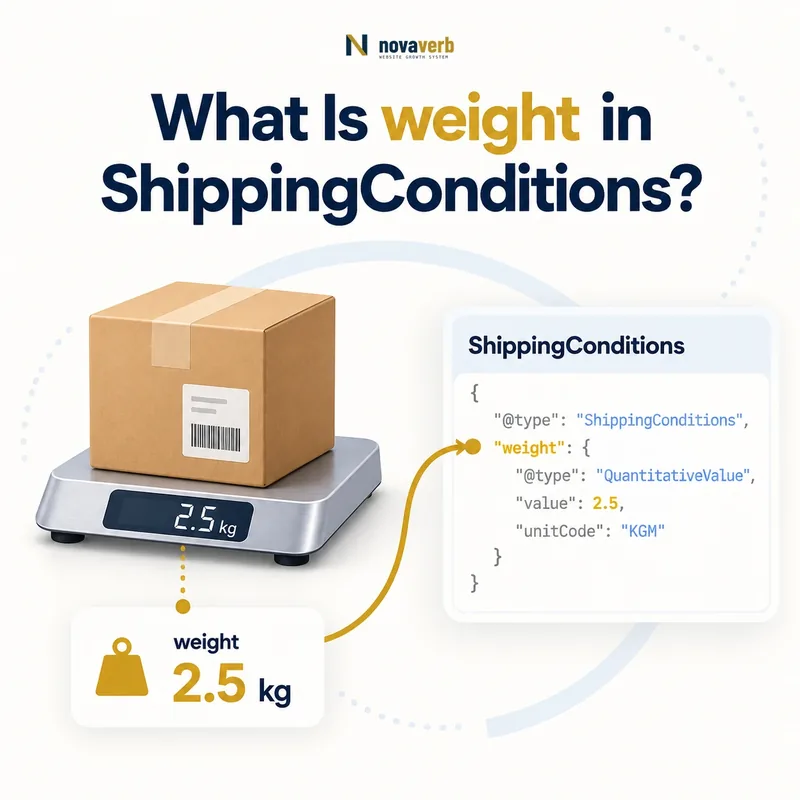
What Is weight in ShippingConditions?
weight is a Mass or QuantitativeValue that limits a ShippingConditions rule to products or shipments within a specified weight measurement or range.
It can separate parcel rates, heavy-item surcharges, freight eligibility, and unavailable routes. The property determines when the surrounding shipping condition applies; it does not state the shipping charge or calculate carrier billable weight by itself.
A useful rule needs a numeric value or min/max range and an explicit unit. The measurement must match the operational weight used by checkout, including any packaging or shipment aggregation policy defined by the merchant.
- Identify the exact page, asset, entity or relationship described in this section.
- Inspect the live implementation and retain the observed evidence.
- Compare the observation with the intended meaning and its primary specification.
- Correct any mismatch, then retest the live result.
- Record the accountable owner and review date.
| Case | Meaning | Action |
|---|---|---|
| weight | Mass constraint | 0–50 lb |
| Mass | Expected value type | Weight measurement |
| QuantitativeValue | Structured measurement | Range and unit |
| minValue | Lower boundary | 50 |
| maxValue | Upper boundary | 70 |
- Define the measured object.
- Use an explicit unit.
- Match the checkout authority.
Use the free backlink checker to identify linked product pages before changing heavy-item shipping promises.
Primary specification: Schema.org definition for weight.
weight is accurate when its measurement selects exactly the shipments receiving the surrounding rule.
Where Does weight Belong?
weight belongs on ShippingConditions when it constrains a reusable shipping rule, and it can also appear on Product or OfferShippingDetails for other weight intents.
Parent context determines meaning. Product weight describes the item. OfferShippingDetails weight can describe an Offer's shipping detail. ShippingConditions weight defines the measurement band where a rate, transit time, or exclusion applies.
Do not copy one Product value into every condition without considering quantity, packaging, or split shipments. ShippingService reaches the conditional property through shippingConditions.
- The exact page, asset, entity or relationship covered by this section
- The live implementation rather than an editor-only preview
- The primary specification or first-party record defining the expected behavior
- The validation result, accountable owner and review date
| Case | Meaning | Action |
|---|---|---|
| ShippingConditions | Rule threshold | Rate or eligibility band |
| Product | Item measurement | Product fact |
| OfferShippingDetails | Offer shipping detail | Offer context |
| ShippingService → conditions | Reusable route rule | Correct path |
- Identify product fact or rule threshold.
- Choose the correct parent.
- Add measurement and unit.
- Connect destination and outcome.
- Validate the graph.
Review ShippingConditions for the parent rule.
Correct placement distinguishes an item's weight fact from a weight-based shipping condition.
Should You Use Mass or QuantitativeValue?
Use Mass or QuantitativeValue according to the source model, with QuantitativeValue especially useful when minValue, maxValue, value, unitCode, or unitText must be explicit.
A single exact measurement can use value plus a unit. A tier needs minValue and maxValue. Keep numeric fields as numbers and avoid packing a range such as 10–20 lb into one unstructured string when structured boundaries are available.
The choice should remain consistent across product data, shipping rules, and audit tooling. A parser that understands QuantitativeValue can compare units and boundaries more reliably than free text.
- Identify the exact page, asset, entity or relationship described in this section.
- Inspect the live implementation and retain the observed evidence.
- Compare the observation with the intended meaning and its primary specification.
- Correct any mismatch, then retest the live result.
- Record the accountable owner and review date.
| Case | Meaning | Action |
|---|---|---|
| Exact 10 lb | value plus LBR | Single measurement |
| 10–20 lb | minValue and maxValue | Range |
| 10-20 lbs text | Hard to validate | Use structured fields |
| Mass node | Valid weight type | Preserve source model |
- Choose exact value or range.
- Keep numeric values numeric.
- Supply a recognized unit.
- Test serialization.
Structured weight values are strongest when number, range, and unit remain independently machine-readable.
Which Weight Units Should US Shipping Use?
US shipping conditions should use a consistent unit vocabulary, commonly LBR for pounds or KGM for kilograms, and must convert values before comparing thresholds.
Never compare 50 pounds with 50 kilograms as if they are equal. UnitText such as lb or kg can aid readability, while a controlled unitCode supports consistent joins. Ounces may require their own supported unit representation and exact conversion policy.
Choose the unit used by the rate engine or normalize all source measurements to one canonical unit with documented precision. Preserve the original measurement for evidence, and round only where checkout does.
- The exact page, asset, entity or relationship covered by this section
- The live implementation rather than an editor-only preview
- The primary specification or first-party record defining the expected behavior
- The validation result, accountable owner and review date
| Case | Meaning | Action |
|---|---|---|
| LBR | Pound | Common US unit |
| KGM | Kilogram | International unit |
| lb text | Readable label | Keep code consistent |
| Missing unit | Ambiguous number | Reject |
| Converted threshold | Precision risk | Match checkout rounding |
- Select one comparison unit.
- Convert before evaluating ranges.
- Document rounding precision.
- Retain source values.
- Test threshold edges.
A weight threshold is interpretable only when its unit and conversion behavior are explicit and consistent.
How Do minValue and maxValue Define Weight Tiers?
minValue and maxValue define the lower and upper weight boundaries for which a ShippingConditions rule applies.
A parcel tier can cover zero through 50 pounds, an oversize parcel tier more than 50 through 70 pounds, and freight above 70 pounds. Actual boundary choices must follow the merchant's carrier and fulfillment configuration.
Document whether endpoints are included and avoid gaps or overlaps for the same service and destination. Test immediately below, exactly at, and immediately above each threshold using the same measurement precision and rounding as checkout.
- Identify the exact page, asset, entity or relationship described in this section.
- Inspect the live implementation and retain the observed evidence.
- Compare the observation with the intended meaning and its primary specification.
- Correct any mismatch, then retest the live result.
- Record the accountable owner and review date.
| Case | Meaning | Action |
|---|---|---|
| 0–50 LBR | Standard parcel | Test 49.99 and 50 |
| >50–70 LBR | Heavy parcel | Test 50.01 and 70 |
| >70 LBR | Freight | Test 70.01 |
| Overlap at 50 | Two rates match | Repair inclusivity |
| Gap after 70 | No service | Add rule or exclusion |
- Define carrier boundaries.
- Set consistent units.
- Document endpoint behavior.
- Test three points per threshold.
Weight tiers are dependable when every measured shipment resolves to one intentional band.
How Do Actual and Dimensional Weight Interact?
Actual and dimensional weight should follow the carrier's billable-weight logic, while structured shipping conditions must avoid claiming a simple mass threshold when dimensions can change the outcome.
A light but bulky package can be billed above its scale weight. The weight property does not calculate dimensional weight automatically; width, height, and depth can provide separate condition context, and the merchant's rate engine remains the authority for billable measurement.
If checkout uses the greater of actual and dimensional weight, document that calculation in the source policy. Test dense, lightweight-bulky, and multi-package products. Do not label a dimensional result as actual physical mass.
- The exact page, asset, entity or relationship covered by this section
- The live implementation rather than an editor-only preview
- The primary specification or first-party record defining the expected behavior
- The validation result, accountable owner and review date
| Case | Meaning | Action |
|---|---|---|
| Dense package | Actual may govern | Scale evidence |
| Light bulky package | Dimensional may govern | Dimensions and divisor |
| Missing dimensions | Billable weight uncertain | Investigate |
| Several packages | Per-package calculation | Avoid naive total |
| Dimensional result | Billing measure | Do not call actual mass |
- Capture actual weight.
- Capture package dimensions.
- Apply the checkout formula.
- Preserve measurement meaning.
Weight-based markup remains truthful when actual mass and dimensional billing logic are not conflated.
How Does Weight Interact With Quantity and Destination?
weight, numItems, destination, orderValue, dimensions, and product scope can jointly constrain one ShippingConditions rule, and every specified condition must match.
Five lightweight units may remain parcel eligible while five heavy units require freight. The same 60-pound item may ship within the contiguous US but not to Alaska. A high cart value does not automatically override a carrier weight restriction.
Build a decision matrix across quantity, aggregated shipment weight, route, subtotal, and product cohort. Test intersections rather than validating each property alone.
- Identify the exact page, asset, entity or relationship described in this section.
- Inspect the live implementation and retain the observed evidence.
- Compare the observation with the intended meaning and its primary specification.
- Correct any mismatch, then retest the live result.
- Record the accountable owner and review date.
| Case | Meaning | Action |
|---|---|---|
| 5 items, 20 lb | Parcel tier | Count and weight match |
| 5 items, 100 lb | Freight tier | Weight changes outcome |
| 60 lb to California | Heavy parcel possible | Destination matters |
| 60 lb to Alaska | Possible exclusion | Route matters |
| High-value heavy cart | Still restricted | Value is separate |
- List all condition dimensions.
- Define aggregation behavior.
- Generate intersection carts.
- Resolve one service outcome.
Compare numItems, orderValue, and shippingDestination.
Combined conditions are coherent when count, weight, value, and geography resolve together without gaps.
What weight Schema Mistakes Are Common?
Common mistakes include missing units, mixing pounds and kilograms, using net product weight instead of packed shipment weight, reversed bounds, gaps or overlaps, stale carrier thresholds, and checkout mismatches.
Other defects include ignoring dimensional weight, summing multi-package shipments incorrectly, applying one variant's weight to every Offer, and treating a syntax-valid measurement as operational proof. A value can be technically valid but commercially false.
Weight defects often originate in shared catalog or fulfillment data. Repair the authoritative measurement and packaging logic, then regenerate affected pages and conditions.
- The exact page, asset, entity or relationship covered by this section
- The live implementation rather than an editor-only preview
- The primary specification or first-party record defining the expected behavior
- The validation result, accountable owner and review date
| Case | Meaning | Action |
|---|---|---|
| 50 without unit | Ambiguous threshold | Add unit |
| LBR compared with KGM | Wrong tier | Convert first |
| Net instead of packed | Underquoted rate | Use shipping measure |
| Variant inheritance | Wrong product cohort | Validate each Offer |
| Old carrier limit | Stale service | Sync policy |
- Extract every weight and parent.
- Normalize units for analysis.
- Find boundary gaps and overlaps.
- Compare packed checkout weights.
- Repair the source.
weight defects require measurement, unit, packaging, range, route, and checkout validation together.