
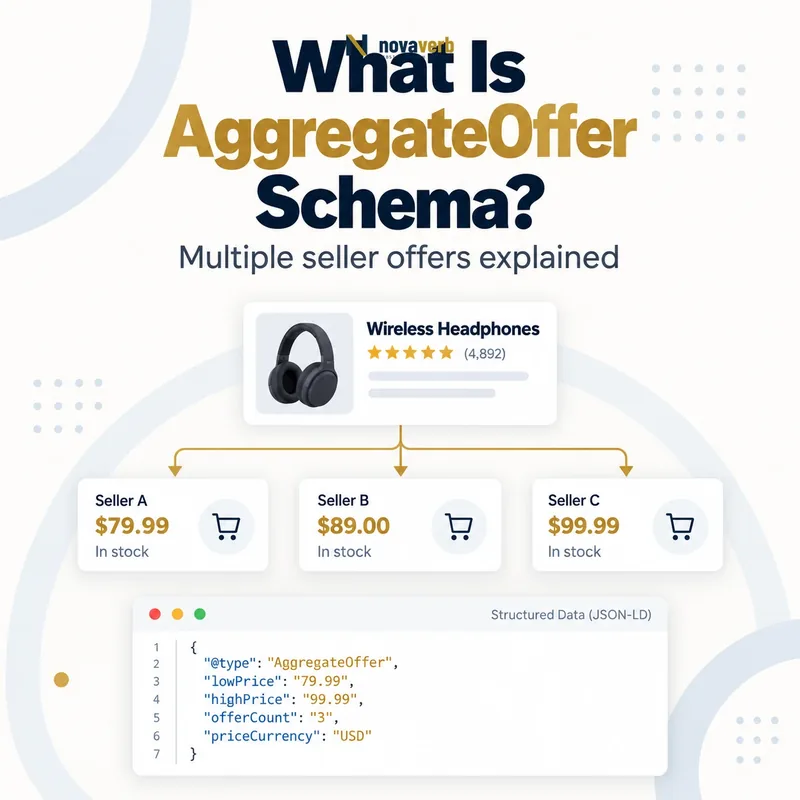
What Is AggregateOffer Schema?
AggregateOffer Schema summarizes multiple genuine offers for the same product using the lowest price, currency, optional highest price and offer count.
It is a subtype of Offer designed for aggregation rather than one seller transaction. A comparison page can use it when several merchants sell the exact same product and users can inspect the represented price range. The parent remains a specific Product; AggregateOffer supplies a compact commercial summary through lowPrice, highPrice, priceCurrency and offerCount. It does not mean “all versions of this product,” and it should not combine different models, sizes or unrelated bundles merely to create a broad range. Product snippet experiences may use this evidence, but valid markup does not guarantee appearance, ranking or CTR. The summary must be recomputed from visible, current offers rather than stored as independent SEO copy.
- Frame the decision raised by What Is AggregateOffer Schema.
- Confirm its value type and the object it describes.
- Compare the markup with visible page information.
- Correct the source data or template without inventing values.
- Validate the rendered result and monitor future changes.
| Entity | Role | Example |
|---|---|---|
| Product | Exact item compared | Camera model X |
| AggregateOffer | Summarizes seller offers | $799–$849 |
| lowPrice | Lowest current offer | 799.00 |
| highPrice | Highest current offer | 849.00 |
| priceCurrency | Shared currency | USD |
| offerCount | Number of represented offers | 4 |
- Aggregate one exact product.
- Use visible current offers.
- Keep one currency context.
- Avoid appearance guarantees.
AggregateOffer is reliable when one exact product has several visible current offers that mathematically reconcile to the published range and count.
The decision for What Is AggregateOffer Schema should rest on live, traceable evidence and a verified follow-up check.
When Should You Use AggregateOffer?
Use AggregateOffer when a product-focused page genuinely summarizes several offers for the same item, usually from multiple sellers or comparable transaction sources.
A price-comparison page showing five retailers for one television fits. An aggregator may also summarize several condition-specific offers when the page clearly exposes those distinctions. A merchant selling one item at one active price should use Offer Schema, not an artificial range. Category grids, “best products” lists and brand pages fail the one-product focus expected by product rich results. AggregateOffer is also inappropriate when the underlying offers use mixed currencies without a stable page and conversion policy. The page should reveal the sellers or offers behind the summary so a reader can understand where lowPrice and offerCount came from. If only one valid offer remains, switch the model to Offer rather than preserving a misleading aggregate.
- Evidence for When Should You Use AggregateOffer: the live structured-data entity and property relationship
- The expected value type and any nested object
- Visible page information that supports the structured value
- Related offer or catalog fields needed for interpretation
- A fresh validation result after the page changes
| Page pattern | Use AggregateOffer? | Reason |
|---|---|---|
| One product, many sellers | Yes | Real offer aggregation |
| One product, one seller | No | Use Offer |
| Product category | No | Many primary products |
| Variant family range | No | Not a seller-offer aggregate |
| Mixed products bundle list | No | Identity mismatch |
| One product, visible condition offers | Possible | If clearly comparable |
- Resolve exact product identity.
- Count valid offers.
- Confirm visible comparison.
- Choose Offer or AggregateOffer.
Choose AggregateOffer from the number and nature of real offers, not from a desire to display a wider price range.
The decision for When Should You Use AggregateOffer should rest on live, traceable evidence and a verified follow-up check.
Which AggregateOffer Properties Are Required?
AggregateOffer requires lowPrice and priceCurrency for product snippet use, while highPrice and offerCount provide the complete range and scale.
The numeric lowPrice is the minimum across all represented offers and uses a decimal point for fractions. priceCurrency is a three-letter ISO 4217 code such as USD. highPrice should equal the maximum current price, and offerCount should equal the number of offers in the exact aggregation set. Schema.org also allows nesting individual offers, but search-feature support and page relevance determine whether that extra detail is useful. Do not substitute Offer.price, lowPrice text containing a dollar sign or a range string such as “$99–$129.” Required completeness does not prove truth: the numbers still need source records, timestamps and visible parity. Keep all values scoped to one product and currency.
- Frame the decision raised by Which AggregateOffer Properties Are Required.
- Confirm its value type and the object it describes.
- Compare the markup with visible page information.
- Correct the source data or template without inventing values.
- Validate the rendered result and monitor future changes.
| Property | Status | Validation |
|---|---|---|
| lowPrice | Required | Minimum numeric offer |
| priceCurrency | Required | ISO 4217 code |
| highPrice | Recommended | Maximum numeric offer |
| offerCount | Recommended | Count of represented offers |
| offers | Schema.org relationship | Nested offers when appropriate |
| availability | Inherited vocabulary | Use only if aggregation meaning is clear |
- Compute minimum and maximum.
- Use one ISO currency.
- Count the same records.
- Retain source evidence.
A complete aggregate publishes a numeric minimum, one explicit currency, the true maximum and the exact count from the same offer set.
The decision for Which AggregateOffer Properties Are Required should rest on live, traceable evidence and a verified follow-up check.
How Is AggregateOffer Different From Offer?
Offer describes one seller transaction, while AggregateOffer summarizes several offers for the same product and cannot replace a merchant-owned Offer.
Offer uses an active price, seller, availability and destination for a specific transaction. AggregateOffer uses lowPrice and optional highPrice plus offerCount to describe a set. Merchant listing experiences require Offer because the merchant publishing the page must be the seller; AggregateOffer belongs to the broader Product Snippet Schema path. Price-drop enhancement also relies on Offer rather than AggregateOffer. Do not place lowPrice on Offer or price on AggregateOffer merely because a plugin exposes the field. When a comparison page links to several sellers, preserve individual source offers internally so the aggregate can be verified. When a merchant page has several variants, model variants rather than disguising their prices as competing offers.
- Evidence for How Is AggregateOffer Different From Offer: the live structured-data entity and property relationship
- The expected value type and any nested object
- Visible page information that supports the structured value
- Related offer or catalog fields needed for interpretation
- A fresh validation result after the page changes
| Dimension | Offer | AggregateOffer |
|---|---|---|
| Meaning | One transaction | Several offers |
| Price property | price | lowPrice/highPrice |
| Seller context | One seller | Multiple represented offers |
| Merchant listing | Supported requirement | Not sufficient |
| Price drop | Eligible pattern | Not eligible pattern |
| Variant range | Not by itself | Not valid aggregation |
- Identify transaction count.
- Check seller ownership.
- Apply correct price fields.
- Retire the wrong type.
Use Offer for one purchasable transaction and AggregateOffer only for a transparent comparison set tied to one product.
The decision for How Is AggregateOffer Different From Offer should rest on live, traceable evidence and a verified follow-up check.
Why Should AggregateOffer Not Describe Variants?
AggregateOffer should not describe product variants because variants are distinct product identities or configurations, not competing offers for one exact item.
A shirt’s sizes and colors can carry different SKUs, GTINs, images, availability and sometimes prices. Their relationship belongs in Product Variant Schema using ProductGroup and child Products. Taking the cheapest small shirt and most expensive large shirt to form lowPrice/highPrice obscures which item a shopper receives. Similarly, storage capacities, subscription tiers and bundled accessories can change the product identity or offer scope. An AggregateOffer range should compare equivalent offers after normalizing the exact product, condition, quantity, currency and materially relevant terms. If several retailers sell the same blue size-medium shirt, those records can form an aggregate for that variant. The rule protects both entity clarity and price honesty.
- Frame the decision raised by Why Should AggregateOffer Not Describe Variants.
- Confirm its value type and the object it describes.
- Compare the markup with visible page information.
- Correct the source data or template without inventing values.
- Validate the rendered result and monitor future changes.
| Difference | Variant dimension | Offer dimension |
|---|---|---|
| Color | Changes product configuration | Seller does not |
| Size | Changes sellable SKU | Seller does not |
| Storage | Changes model capacity | Seller does not |
| Condition | May define offer subset | Can be compared visibly |
| Retailer | Same exact product | Creates multiple offers |
| Currency | Separate URL/context | Not a product variant |
- Resolve child product identity.
- Normalize condition and quantity.
- Separate variant ranges.
- Compare equivalent offers only.
Aggregate only commercially comparable records for the same variant, and model configuration differences through the product hierarchy.
The decision for Why Should AggregateOffer Not Describe Variants should rest on live, traceable evidence and a verified follow-up check.
How Should LowPrice, HighPrice and OfferCount Be Calculated?
Calculate lowPrice, highPrice and offerCount from the same filtered set of active, visible and comparable offers in one currency.
Begin with source offers for the exact product or variant. Exclude expired, unavailable, duplicated, malformed and nonvisible records according to documented rules. Decide whether shipping, tax, coupons or membership requirements are included and make that convention clear on the page; do not compare a member-only net price with unrestricted standard prices as though terms were equal. Convert currencies only when the page visibly states the conversion and has a stable currency context, though separate currency URLs are safer for product features. The minimum and maximum must be numeric and the count must equal the records considered. Recompute all three in one transaction so a removed low offer cannot leave a stale minimum with a new count.
- Evidence for How Should LowPrice, HighPrice and OfferCount Be Calculated: the live structured-data entity and property relationship
- The expected value type and any nested object
- Visible page information that supports the structured value
- Related offer or catalog fields needed for interpretation
- A fresh validation result after the page changes
| Calculation step | Rule | Failure prevented |
|---|---|---|
| Identity filter | Exact product/variant | Mixed item range |
| Status filter | Active visible offers | Expired minimum |
| Currency filter | One currency | Invalid comparison |
| Terms filter | Comparable access | Member-price distortion |
| Min/max | Same record set | Inconsistent range |
| Count | Same record set | Misleading offerCount |
- Filter exact identity.
- Remove invalid offers.
- Normalize currency and terms.
- Compute range and count atomically.
Range and count are credible only when one documented filter and one timestamp produce all three values.
The decision for How Should LowPrice, HighPrice and OfferCount Be Calculated should rest on live, traceable evidence and a verified follow-up check.
How Do You Write AggregateOffer JSON-LD?
Write AggregateOffer JSON-LD by nesting one AggregateOffer inside an exact Product and serializing its computed lowPrice, priceCurrency, highPrice and offerCount.
Use an application/ld+json script generated from the same product and offer records that render the comparison page. The parent Product should include a precise name, representative image and valid identifiers when available. Under offers, set @type: AggregateOffer and add numeric values without symbols or formatted separators. If you expose individual offers, ensure their seller, price, URL and availability reconcile with the summary. Use canonical absolute URLs and stable entity IDs. Related JSON-LD and Breadcrumb Schema can coexist in a graph without duplicating Product identities. Validate rendered production output, then recompute the aggregate independently to catch correct syntax with wrong arithmetic.
- Frame the decision raised by How Do You Write AggregateOffer JSON-LD.
- Confirm its value type and the object it describes.
- Compare the markup with visible page information.
- Correct the source data or template without inventing values.
- Validate the rendered result and monitor future changes.
| JSON-LD field | Example | QA check |
|---|---|---|
| Product.name | Camera X | Exact item |
| Product.offers.@type | AggregateOffer | Correct aggregate type |
| lowPrice | 799.00 | Equals source minimum |
| highPrice | 849.00 | Equals source maximum |
| priceCurrency | USD | One stable currency |
| offerCount | 4 | Equals valid records |
- Nest under exact Product.
- Use unformatted numbers.
- Reconcile nested offers.
- Test rendered arithmetic.
Production JSON-LD should serialize a reproducible aggregation result, with every number traceable to visible source offers.
The decision for How Do You Write AggregateOffer JSON-LD should rest on live, traceable evidence and a verified follow-up check.
What AggregateOffer Schema Mistakes Are Common?
Common mistakes include aggregating variants, mixing currencies, counting expired sellers, publishing formatted price strings and using AggregateOffer on merchant pages.
Other defects include lowPrice greater than highPrice, offerCount that reflects all database rows rather than visible valid offers, one-off sale prices left after expiry and duplicate seller records. Some comparison pages show only a headline range but hide the sources, making the commercial evidence impossible to inspect. Plugins may output AggregateOffer simply because several variants exist. A validator can catch missing lowPrice or currency but cannot verify comparable identity, seller freshness or arithmetic. Crawl the rendered page, extract the aggregate and independently calculate it from visible offers. Where the site directly sells one product, replace AggregateOffer with an actual Offer. Fix aggregation logic and source feeds rather than manually editing individual pages.
- Evidence for What AggregateOffer Schema Mistakes Are Common: the live structured-data entity and property relationship
- The expected value type and any nested object
- Visible page information that supports the structured value
- Related offer or catalog fields needed for interpretation
- A fresh validation result after the page changes
| Mistake | Evidence | Fix |
|---|---|---|
| Variant price range | Different SKUs | Model ProductGroup |
| Mixed currencies | USD and CAD records | Separate/filter context |
| Expired minimum | Past offer still counted | Remove stale record |
| Formatted lowPrice | $99.00 | Use numeric value |
| Count mismatch | Visible rows differ | Use same filter |
| Merchant-owned one price | Single checkout offer | Use Offer |
- Verify exact identity.
- Recalculate valid sources.
- Correct type selection.
- Repair shared aggregation.
The highest-risk aggregate errors combine incomparable items or stale sources, producing a price range no shopper can reproduce.
Start with a relevant free SEO check, continue the evidence workflow in Site Health, and review pricing when comparing continuous monitoring with a one-time manual review.
The decision for What AggregateOffer Schema Mistakes Are Common should rest on live, traceable evidence and a verified follow-up check.